
Real World Training
 | For over 20 years, automotive repair professionals have relied on Real World Training for industry-leading automotive repair information. As vehicles become increasingly complex to diagnose and repair, it is essential for repair shops to stay current with this evolving market. Real World Training is available in select markets to meet this need. The advantage for shops is the ability to service vehicles more efficiently, reducing the time bays are occupied and minimizing the likelihood of return visits for the same issue. |
Accessing the O’Reilly Real World Training Website
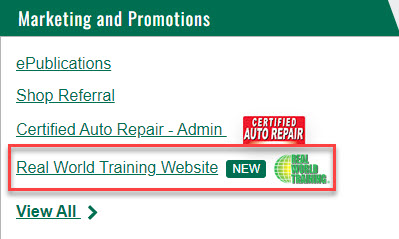
When signed in to OReillyPro.com, you can find the link under the "Resources" section.
Real World Training Landing Page
Upon visiting the website, you will see the landing page, designed to provide an overview of the different types of training available.
- Technician Training: Focuses on enhancing technician's diagnostic skills and ensuring proper repairs to fix vehicles correctly the first time.
- Business Management: Helps shop owners understand the inner workings of their business to improve shop flow and maximize business potential.
- Emerging Technology: Demonstrates our commitment to staying current with technological advancements by working with vendors to keep shop owners and technicians informed.
Logging in to the Real World Training Website
Logging in is simple and easy:
- On the landing page, click the "Login" button at the top right of the screen.
- Simple login:
- OReillyPro.com Users: Click the “Yellow” button to log in with the email and name listed in OReillyPro.com.
Finding and Registering for an Event
After logging in, users will be directed to the "Listing of Events" page, where they can:
- Use filters at the top of the page to narrow down their search by either In-Person or Virtual classes, by State, and/or by Topic.
- Select a class to view its details, including the topic, date and time, cost, description, location, and instructor.
To register:
- Click the yellow “Register Now” button.
- Click the “Register” button next to your name, verify all information, and click “Submit Registration”.
- For OReillyPro.com users, you can send a pick ticket to your servicing store to pay for the class by clicking “Review Order” and then “Pay-Bill Me” at the bottom of the next page.
Adding Registrants Under an Account
You can add multiple registrants under your account to simplify signing up multiple people:
- Click the “My Account” button at the top right corner of the screen.
- Click “Add Another Person to Your Account” at the bottom of the page.
- Fill out the required fields and click “Save Changes and Create Account”. This creates sign-in credentials for the new registrant.
Alternatively, registrants can be added while registering for a class:
- After finding the desired class, click the “Register Now” button.
- Click the “Add Another Person to Your Account” button and follow the above steps.
For further assistance, please contact your O'Reilly Sales Representative.